1. Open Outlook 2019.

2. In the left panel, you can see a list of your email accounts. Double click on Inbox. This will expand it and display the inbox, the trash list. Etc.
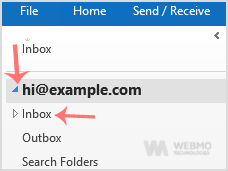
3. Click on Inbox, and it will start syncing.
1. Open Outlook 2019.
2. In the left panel, you can see a list of your email accounts. Double click on Inbox. This will expand it and display the inbox, the trash list. Etc.
3. Click on Inbox, and it will start syncing.
Powered by WHMCompleteSolution
